

ChatGPT prompt tricks completely changed how I use AI—and honestly, I wish I had learned these earlier.
I used to sit there typing long, confusing prompts… rewriting them again and again… and still getting average answers. Sound familiar?
Here’s the truth I learned the hard way:
👉 It’s not about asking more. It’s about asking better.
In this blog, I’ll show you 3 simple but powerful ChatGPT prompt tricks that instantly improve your results. These are beginner-friendly, super practical, and something I personally use almost every day.
📌 TL;DR (Quick Answer – For Busy Readers)
If you’re in a hurry, here’s the quick version:
- TL;DR → Get fast summaries
- ELI5 → Understand complex topics easily
- /human → Make responses sound natural
👉 Combine them for even better results.
📚 Table of Contents
- Why Most People Use ChatGPT the Wrong Way
- ⚡ ChatGPT Prompt Tricks #1: TL;DR (Quick Summaries)
- 🧠 ChatGPT Prompt Tricks #2: ELI5 (Explain Like I’m 5)
- ✍️ ChatGPT Prompt Tricks #3: /human (Natural Writing)
- 💡 Combine These ChatGPT Tips and Tricks for Better Results
- 🎯 Final Thoughts: How to Use ChatGPT Effectively
🤦 Why Most People Use ChatGPT the Wrong Way
(ChatGPT tips and tricks + how to use ChatGPT effectively)
Let me be honest—I was one of those people.
I thought using AI meant writing long prompts like:
“Please explain this in detail with examples and also make it simple and short…”
And guess what?
👉 The response was still confusing.
What I didn’t realize is this:
ChatGPT works best when you give it clear instructions—not long ones.
Think of it like talking to a smart friend.
If you’re vague, you’ll get vague answers.
That’s where these ChatGPT prompt tricks come in.
⚡ ChatGPT Prompt Tricks #1: TL;DR (Quick Summaries)
(ChatGPT shortcuts + improve ChatGPT responses)
This one saved me so much time.
Sometimes I just don’t have the patience to read long answers (especially after a long day 😅). That’s when I use:
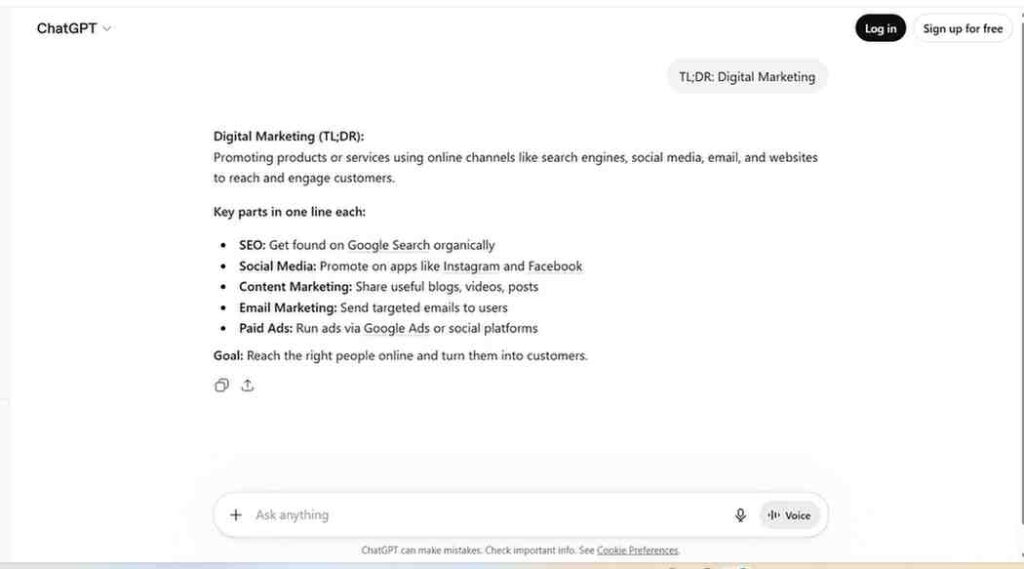
👉 TL;DR: [your topic]
Example:
TL;DR: Digital Marketing
What happens?
- You get a short summary
- Mostly in bullet points
- Only the important stuff
Why this works
ChatGPT understands that you want the essence, not the fluff.
And honestly?
This is one of the best ChatGPT prompts for productivity.
When I personally use it:
- Before starting a new topic
- While revising something quickly
- When reading long PDFs or articles
- Even before meetings (quick prep!)
👉 This is one of my favorite AI productivity tips.
🧠 ChatGPT Prompt Tricks #2: ELI5 (Explain Like I’m 5)
(ChatGPT prompts for beginners + improve ChatGPT responses)
Okay… this one is magic.
There were times I tried learning things like APIs, blockchain, or even finance concepts—and my brain just said:
“Nope. Not today.”
That’s when I discovered:
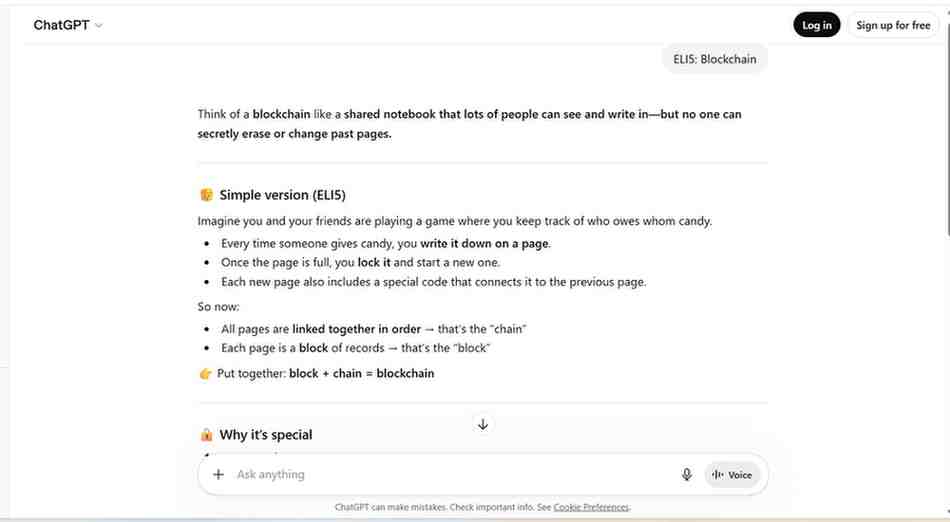
👉 ELI5 = Explain Like I’m 5
Example:
ELI5: Blockchain
What happens?
- ChatGPT explains like you’re a kid
- Uses simple words
- Gives real-life examples
Why this works
Here’s something I realized:
👉 If you can’t explain something simply, you don’t understand it.
ELI5 forces ChatGPT to break things down in the simplest way possible.
Real-life moment 👇
I once struggled to understand “APIs” for my Angular project.
Then I typed:
ELI5: API
And boom 💥
It explained it like a waiter taking orders in a restaurant.
That one analogy stuck with me forever.
When to use:
- Learning coding concepts
- Understanding finance or AI
- Teaching someone else
- Starting from zero
👉 This is one of the most useful ChatGPT prompts for beginners.
✍️ ChatGPT Prompt Tricks #3: /human (Natural Writing)
(best ChatGPT prompts + ChatGPT tips and tricks)
Let’s talk about something annoying.
Have you ever read a ChatGPT response and thought:
👉 “Why does this sound like a robot wrote it?”
Yeah… me too.
That’s when I started adding:
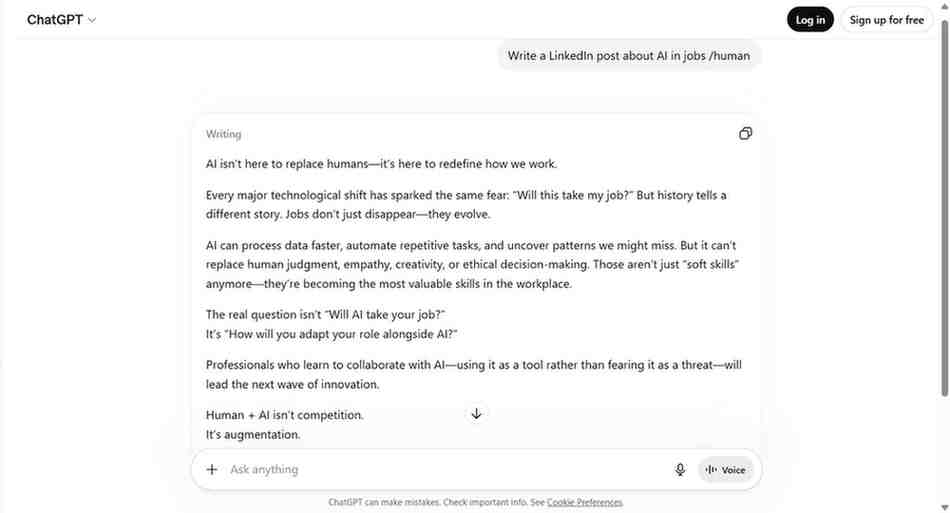
👉 /human
Example:
Write a LinkedIn post about AI in jobs /human
What happens?
- More natural tone
- Easy-to-read sentences
- Sounds like a real person
Why this works
It nudges ChatGPT to shift from “formal AI mode” → “human writing mode”.
And trust me, it makes a huge difference.
Where I use it:
- Blog writing
- LinkedIn posts
- Emails
- Marketing content
- Even WhatsApp messages sometimes 😄
👉 This is one of the most underrated ChatGPT shortcuts.
💡 Combine These ChatGPT Tips and Tricks for Better Results
(how to use ChatGPT effectively + AI productivity tips)
Here’s where things get interesting.
You don’t have to use just one trick.
👉 You can combine them.
Example:
ELI5: Artificial Intelligence /human
What you get:
- Simple explanation ✅
- Natural tone ✅
- Easy to understand ✅
Honestly, this is how I use ChatGPT most of the time now.
Another combo I love:
TL;DR: Machine Learning /human
👉 Quick + readable = perfect.
🔥 My Personal Workflow (Real Use Case)
Let me show you how I actually use these ChatGPT prompt tricks in my daily work:
When learning something new:
- Start with TL;DR → get overview
- Use ELI5 → understand deeply
- Use /human → rewrite for notes
That’s it.
No complicated prompts.
No stress.
🌍 Helpful Resources (Internal + External Links)
If you want to go deeper into how to use ChatGPT effectively, here are some useful resources:
- 🔗 Internal: Check my guide on building smarter prompts (coming soon)
- 🔗 External: GPT-5.2 Prompting Guide
🎯 Final Thoughts: How to Use ChatGPT Effectively
Here’s something I learned after months of using AI:
👉 You don’t need complicated prompts.
👉 You need smart shortcuts.
These ChatGPT prompt tricks may look simple, but they can completely improve ChatGPT responses.
Let’s recap:
- TL;DR → Fast summaries
- ELI5 → Simple understanding
- /human → Natural writing
Start using these today.
And trust me… within a few days, you’ll feel like:
👉 “Why didn’t I use this earlier?” 😄